Post-Signup Surveys That Improve Activation
Activation problems rarely come from one giant issue. They come from small mismatches between what a new user is trying to do and what your onboarding flow assu

Activation problems rarely come from one giant issue. They come from small mismatches between what a new user is trying to do and what your onboarding flow assumes they want.
Post-signup surveys fix that mismatch by capturing intent and friction while the user’s context is fresh, then letting you route them to the right next step.
This guide is a practical playbook for SaaS teams: what to ask, when to ask it, and how to use answers to measurably improve activation (not just “collect feedback”).
What “activation” really means (and why surveys can move it)
Activation is the moment a new user experiences your product’s first meaningful value. In product analytics, it is often tied to an activation event (for example: “created first project,” “invited a teammate,” “connected a data source”).
Post-signup surveys help because they:
- Reduce guesswork about the user’s job-to-be-done (JTBD), role, and urgency.
- Surface blockers you cannot see in event logs (confusion, missing integration, internal approval needed, pricing uncertainty).
- Enable fast routing (template, checklist, doc link, concierge onboarding) so users hit time-to-first-value sooner.
If you track activation and time-to-first-value (TTFV), you can treat surveys as an intervention you measure, not a research project.
The difference between post-signup surveys and “feedback surveys”
A lot of teams reuse the same generic “How was your experience?” prompt everywhere. For activation, you want something more specific.
Post-signup surveys are:
- Lifecycle-specific: they only target brand-new accounts.
- Intent-driven: they ask what the user is trying to accomplish, not how they feel.
- Short and actionable: ideally one question, sometimes two, with answers that map to a next step.
Save CSAT/NPS-style questions for later. (If you do want a satisfaction pulse, keep it tied to a specific moment, for example “after importing data.”)
The activation survey framework: Ask, Route, Adapt
Use this three-part structure so surveys translate into behavior change.
Ask: pick questions that drive an onboarding decision
Good activation questions have two qualities:
- They help you decide what to show next.
- They can be answered in under 10 seconds.
Most SaaS teams get the biggest lift from three categories:
- Use case / goal: what outcome are they here for?
- Role / context: who are they and what environment are they in?
- Friction: what is stopping them right now?
Route: connect answers to a concrete next step
A survey that ends in a spreadsheet does not improve activation.
Routing can be as simple as:
- Showing the right getting-started guide based on selected goal
- Preloading a template
- Prompting an integration connect
- Offering a 10-minute setup call
- Directing to a specific doc article
Adapt: update onboarding paths based on what you learn
After a week or two, look for patterns:
- Which intents activate fastest?
- Which blockers repeat?
- Which answers correlate with churn or low engagement?
Then adapt: rewrite onboarding steps, improve empty states, ship missing integrations, or adjust positioning.
When to ask: the 5 best post-signup survey moments
Timing is half the battle. Ask too early and users guess. Ask too late and you miss the moment.
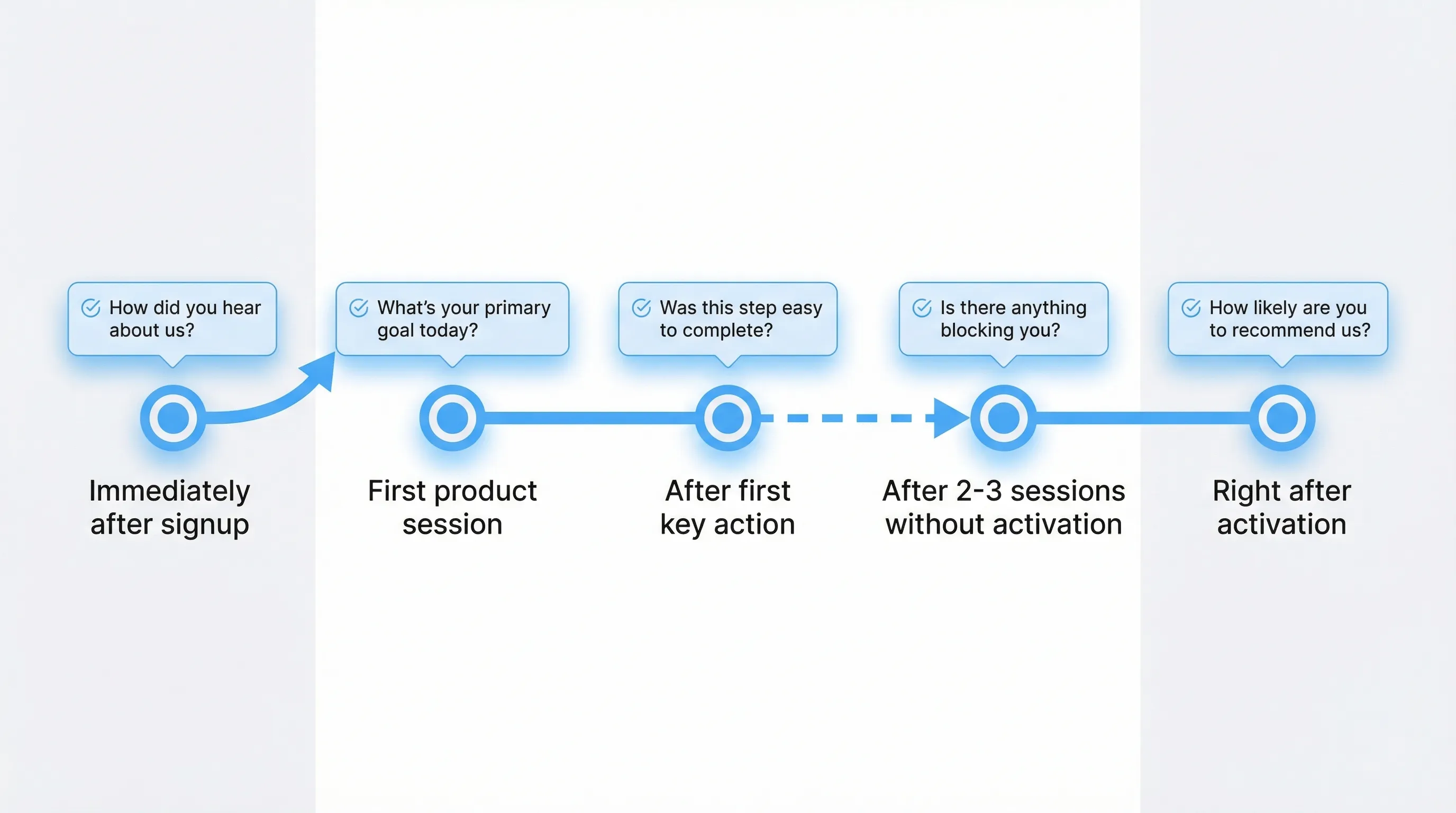
Here are high-leverage moments and what each is good for.
1) Immediately after signup (confirmation screen)
Best for: intent routing and persona capture.
Keep it to one question with a multiple-choice answer set that maps to paths.
Example question:
- “What are you trying to do first?”
Example answer options:
- “Set up my workspace”
- “Connect an integration”
- “Invite my team”
- “Explore features first”
2) First “real” session (after they’ve clicked around)
Best for: catching confusion before it becomes abandonment.
Trigger after a small signal of engagement (for example: 60 to 120 seconds in-product, or after viewing 2 to 3 key pages).
Example question:
- “Did you find what you came here to do?”
Answer options:
- “Yes, I’m on track”
- “Not yet, I’m stuck”
If they pick “stuck,” follow up with one optional open text field:
- “What’s blocking you?”
3) Right after the first key action (micro-success)
Best for: validating onboarding clarity and identifying missing steps.
This is where you learn if your UX is self-serve.
Example question:
- “What almost stopped you from completing that?”
If you prefer multiple-choice:
- “Confusing UI”
- “Missing data/integration”
- “Needed approval from someone”
- “Not sure what to do next”
- “Other”
4) After 2 to 3 sessions with no activation (rescue survey)
Best for: diagnosing silent failure.
Target users who returned but never hit the activation event. This is where you often uncover:
- Wrong expectations (positioning mismatch)
- Setup complexity
- Missing integration
- Pricing or permission blockers
Example question:
- “What’s the main reason you haven’t set this up yet?”
Answer options:
- “I’m evaluating options”
- “I don’t have time”
- “I’m missing an integration”
- “I’m waiting on a teammate”
- “Not sure how to start”
5) Immediately after activation (capture what worked)
Best for: reinforcing the “aha” and making it repeatable.
Example question:
- “What made it click for you?”
This gives you onboarding copy, templates, and sales language straight from users.
A practical survey map you can copy
Use this table to design a minimal, high-signal post-signup survey program.
| Moment | Primary goal | Question (copy-ready) | What you do with answers |
|---|---|---|---|
| Post-signup confirmation | Route onboarding | “What are you trying to do first?” | Show the right checklist, template, or integration CTA |
| First engaged session | Detect confusion | “Are you on track?” (Yes / I’m stuck) | If stuck, offer help route (docs link, chat, call) |
| After key action | Find friction in flow | “What almost stopped you?” | Fix UI, rewrite steps, improve empty states |
| 2 to 3 sessions without activation | Rescue stalled users | “What’s the main reason you haven’t set this up yet?” | Trigger a targeted message or concierge offer |
| Right after activation | Learn the “aha” | “What made it click?” | Turn answers into onboarding content and positioning |
Question templates that work (and what to avoid)
High-performing templates (activation-focused)
Use these when you need answers that translate directly into routing or product improvements.
Use case / goal
- “What are you here to accomplish today?”
- “Which best describes your project?”
Context / role
- “Which team are you on?”
- “How will you use this?” (solo / with a team)
Friction
- “What’s blocking you right now?”
- “What’s missing for you to be successful?”
Expectation check
- “What were you expecting to do that you couldn’t?”
Patterns to avoid (they won’t move activation)
- “Any feedback?” (too broad)
- “Rate your experience” immediately post-signup (no experience yet)
- Multi-question forms right after account creation (adds friction)
If you need deeper discovery, do it later or segment who gets it.
Turning survey answers into activation improvements (real examples)
Below are practical, common SaaS scenarios showing how post-signup survey data becomes an onboarding change.
Example 1: A B2B analytics SaaS with multiple ICPs
Survey insight: 45% of new signups say they want “self-serve dashboards,” but the default onboarding assumes they will “connect a warehouse first.”
Change: After signup, route users to one of two paths:
- Self-serve path: load a sample dataset, guide them to build a dashboard in 3 minutes
- Warehouse path: integration-first checklist
Why it improves activation: Users hit value without waiting on integration setup.
Example 2: A developer tool where activation requires an API key
Survey insight: Many new users select “I’m evaluating options,” and open-text responses mention “need to see docs before setup.”
Change: In the first session, show a small prompt offering:
- A direct link to the “Quickstart” doc
- A copy-paste code snippet
- An optional “Send me the quickstart” email capture
(You can also improve your docs IA, but this fixes the immediate stall.)
Why it improves activation: You match the user’s evaluation behavior instead of fighting it.
Example 3: A collaboration product where inviting a teammate is the activation event
Survey insight: Users say “I’m waiting on my team” or “I need approval.”
Change: Add a routed path:
- “I’m waiting” answer triggers a message: “Want a shareable 1-minute pitch for your team?” with a one-click copy block
- Offer a calendar link for a quick rollout call for larger accounts
Why it improves activation: You address non-product friction (organizational blockers) that analytics cannot reveal.
Guardrails: how to run post-signup surveys without hurting UX (or SEO)
You can improve activation and still respect the experience.
Keep it lightweight
- One question by default
- Optional open-text only when needed
- Always include “Skip”
Use frequency caps and cool-downs
New users are sensitive to interruption. If you run multiple prompts, space them out. Modal prompts that appear too often can feel like the product is “nagging.”
If you need a deeper dive on this, see the Modalcast guide on popup frequency capping that protects UX.
Avoid intrusive interstitials on entry pages
If you also trigger surveys on marketing pages (pricing, landing pages), be mindful of search experience guidelines. Google has specifically called out intrusive interstitials on mobile as a negative experience in its documentation and blog posts, see Google Search Central guidance.
In-product surveys (inside authenticated app routes) are typically a different situation, but the general UX lesson still holds: don’t block the user from doing the thing they came to do.
Respect privacy and data minimization
Activation surveys should not ask for sensitive data. Collect only what you can act on, and be clear why you’re asking.
If you want a structured approach, progressive profiling is a good complement, see Progressive Profiling: A Simple Starter Guide.
Measuring whether post-signup surveys actually improve activation
Treat this like a product experiment.
Core metrics to track
- Activation rate: % of new signups who hit your activation event within a defined window (for example 7 days)
- Time-to-first-value (TTFV): median time from signup to activation
- Onboarding completion rate (if you have a checklist)
- Response rate to the survey (as a quality check)
How to attribute impact
Survey response alone is not success. You want to know whether the routing or intervention improved activation.
Practical approaches:
- A/B test: show post-signup survey + routing to 50%, baseline onboarding to 50%
- Holdout: keep 10 to 20% of new users unprompted
- Before/after with guardrails: acceptable for early-stage products, but watch for seasonality and acquisition mix changes
If you need help choosing predictive engagement metrics (including early signals that correlate with retention), see Engagement Metrics That Predict Retention in 2025.
Implementation notes: running post-signup surveys with a lightweight widget
You do not need a heavyweight in-app survey platform to start. The key is shipping fast, then iterating.
A simple workflow looks like this:
- Create a short microsurvey (one question, multiple-choice)
- Trigger it on post-signup pages or early onboarding screens
- Add a second “rescue” survey for users who return without activating
- Review responses weekly, then adjust onboarding steps and messaging
Modalcast is designed for this style of lightweight engagement, using a single widget to collect feedback, share updates, and capture leads. If you want a hands-on walkthrough of the mechanics, start with How To Set Up Microsurveys in Your Website or App or the quick blueprint in Ship a Feedback Website Tool in 15 Minutes.
A 7-day rollout plan (so this doesn’t turn into a “someday” project)
Day 1 to 2: define activation and pick one intervention
- Choose the activation event you care about
- Pick one post-signup survey moment (start with the confirmation screen)
Day 3: write the question and map answers to routes
- 1 question, 3 to 5 answer options
- Each answer should map to one next step (template, checklist, docs link, support offer)
Day 4: ship and QA
- Check mobile behavior
- Ensure “Skip” works
- Ensure frequency caps prevent repeated prompts in one session
Day 5 to 7: review responses and make one onboarding change
- Look for repeated friction
- Ship one concrete improvement (copy change, checklist reorder, template creation)
Repeat next week with the “no activation after 2 sessions” rescue survey.
Frequently Asked Questions
What is a post-signup survey? A post-signup survey is a short, targeted prompt shown right after a user creates an account (or in their first sessions) to capture intent and blockers.
How many questions should a post-signup survey have? One question is the default. If you need more detail, add one optional open-text follow-up only after a high-signal answer like “I’m stuck.”
When should I show a post-signup survey in my SaaS app? High-leverage moments include immediately after signup, during the first engaged session, after the first key action, and as a rescue prompt after repeat sessions without activation.
Should post-signup surveys be modal popups? They can be, but do not block the user’s primary task. Many teams use slide-ins, a floating button, or post-action prompts to reduce friction.
How do I know if the survey is improving activation? Measure activation rate and time-to-first-value with a holdout or A/B test. The success metric is activation lift, not survey response rate.
Put post-signup surveys into production without adding complexity
If you want to test post-signup surveys quickly, Modalcast gives you a lightweight widget to publish microsurveys, capture feedback, and trigger targeted on-site messages.
Start with one question, route users to a better next step, then iterate based on what you learn: Try Modalcast.
