Popup Frequency Capping That Protects UX
Popups can fuel conversions, but without frequency capping they quickly erode trust, inflate bounce rates, and trigger survey fatigue. Thoughtful caps protect user experience while still letting your website popup tool do its job.

Popups can fuel conversions, but without frequency capping they quickly erode trust, inflate bounce rates, and trigger survey fatigue. Thoughtful caps protect user experience while still letting your website popup tool do its job. This guide gives SaaS and website teams a practical system for setting caps, picking cooldown windows, and measuring impact so you can collect feedback, capture leads, and promote offers without annoying people.
Why frequency capping matters for UX and growth
- Intrusive overlays harm discoverability and search visibility. Google has long warned against mobile experiences that block content with interstitials, which can affect search performance. See Google’s guidance on intrusive interstitials for context: Google Search Central.
- Overlays interrupt tasks. UX research recommends using modals sparingly and making them easy to dismiss. See Nielsen Norman Group.
- Fatigue is real. Repeated prompts degrade response quality and willingness to engage. See Qualtrics on survey fatigue.
- Accessibility favors user control. Reducing interruptive prompts aligns with WCAG 2.1, 2.2.4 Interruptions which encourages limiting nonessential interruptions or letting users postpone them.
The takeaway, popups must be paced. Frequency capping is the pacing layer that balances revenue goals with long term UX.
Core principles of respectful frequency capping
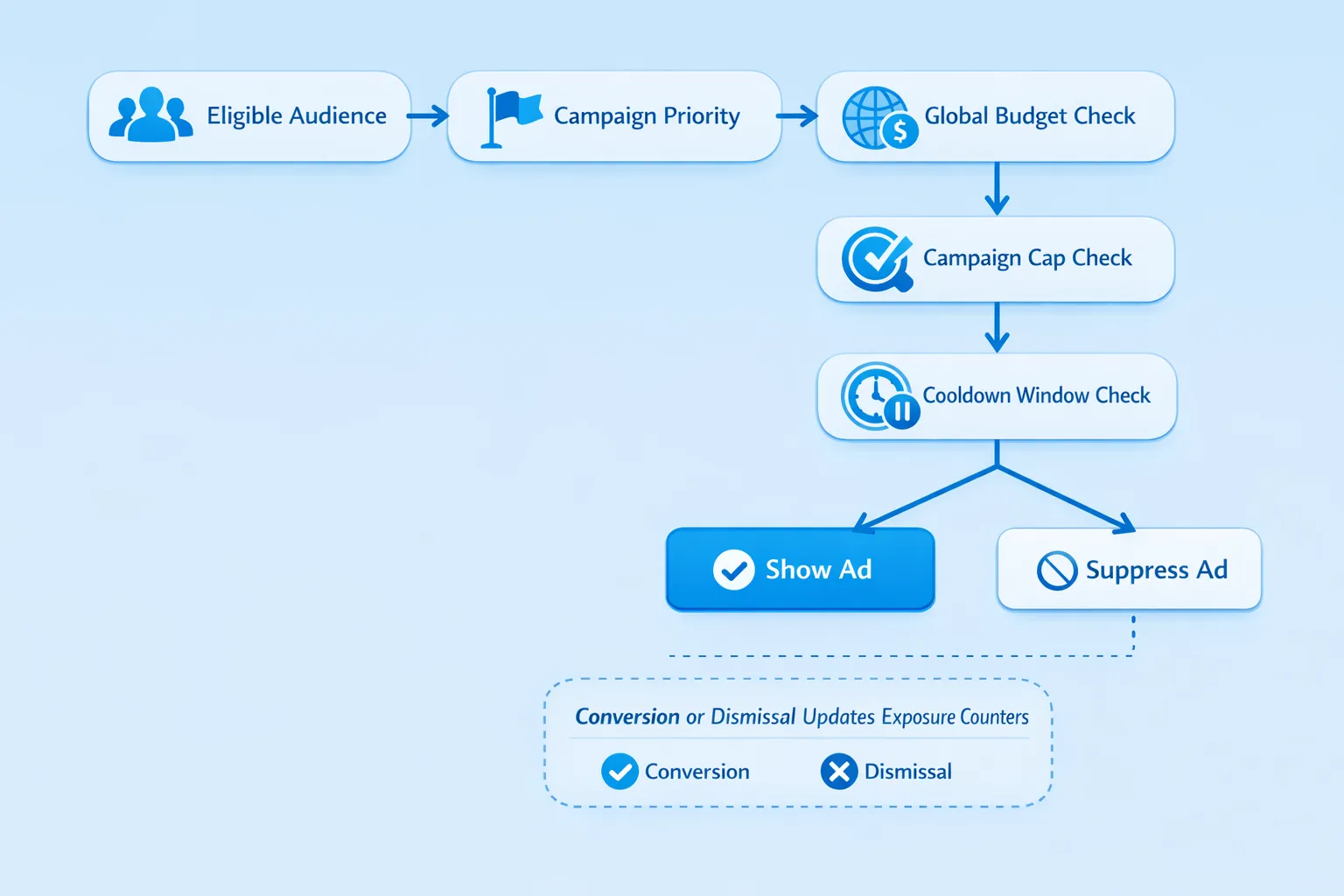
- Set a global intensity budget. Decide how many interruptive prompts any visitor can see in a session and across a time window, then stick to it.
- Prioritize by intent. High intent moments justify more assertive prompts, for example exit intent on pricing, while low intent contexts do not, for example first three seconds on a blog post.
- Respect memory. Remember dismissals and submissions, do not ask the same thing again for a sensible cooldown period.
- Segment by device and journey stage. Mobile needs stricter caps. Paying users should see far fewer prompts than anonymous visitors.
- Measure and adjust. Use guardrail metrics to ensure caps protect UX while keeping conversion lift.
The building blocks of a good capping system
- Global cap, per session and per rolling window, for example 1 interruptive popup per session, 2 per 7 days.
- Per campaign cap. Limit shows per user, per session, per day, and lifetime where appropriate.
- Cooldowns and decay windows. After a dismissal, wait N days before showing a similar prompt. After a conversion, suppress permanently or for a long period.
- Page type rules. For example, allow exit intent on pricing, suppress everything on checkout or payment pages.
- Device rules. Stricter caps on mobile and tablets to protect small screens.
- Cross campaign suppression. If a visitor saw any prompt this session, deprioritize others. If they already joined the newsletter, do not show newsletter prompts anywhere.
- Channel aware rules. If the visitor arrived from an email campaign about a coupon, suppress the on site coupon prompt.
Recommended starting caps by scenario
These values are battle tested starting points. Adjust based on your audience, device mix, and conversion goals.
| Scenario | Cap and cooldown | Notes |
|---|---|---|
| Newsletter capture on blog | 1 show per session, 1 show per 7 days, suppress after signup | Trigger on 30–60 seconds or 50 percent scroll, never on first 5 seconds. |
| Exit intent on pricing | 1 show per session, 1 per 14 days per user | Use only for new or returning evaluators, not customers. |
| Time limited coupon during trial | Max 1 show per day, 2 shows per week, 1 per session | Automatically suppress after redemption. |
| Microsurvey on docs or help center | 1 show per section per 14 days, 0 if already responded | Trigger at end of article or after 45–90 seconds on page. |
| In product NPS or CSAT | 1 per quarter for active users, suppress for 90 days after response | Ask in a neutral moment after a core action, not at login. |
| Lead magnet download on TOFU pages | 1 per session, 1 per 7 days | Prefer slide ins or inline banners on mobile instead of modals. |
| Returning paying users, all pages | Global 0–1 interruptive prompts per month | Prefer passive toasts and changelogs, avoid sales popups entirely. |
Guardrails to protect UX while you test
Track these as you roll out or tighten caps. Use a holdout group that is eligible but never exposed.
- Bounce rate and time to first interaction on pages where prompts can appear.
- Primary conversion rate, for example signup, demo request, purchase.
- Downstream quality, for example lead quality, activation within a time window.
- Complaint signals, unsubscribe rate, spam reports, negative feedback, support tickets mentioning popups.
- Response quality for surveys, completion rate and open text richness.
If any guardrail degrades by more than a small threshold, for example 3 to 5 percent relative, reduce frequency or expand cooldowns.
For a deeper playbook on balancing prompts with conversions, see our practical guide, Collect Feedback Without Killing Conversions, and the companion pieces Lead Capture That Does not Feel Pushy and High Converting Forms, Best Practices for 2025.
A simple, durable capping policy you can adopt today
Start with a global budget, then layer campaign caps.
- Global budget, 1 interruptive popup per session on desktop, 0 on mobile unless exit intent, max 2 total interrupts per 7 days per user.
- Passive UI elements do not count toward budget, for example floating feedback button, inline banners, small slide ins that do not block content.
- Priority, upgrades or abandonment savers outrank newsletter or general marketing.
- Cooldowns, 7 days after a dismissal, 30 to 90 days after a submission, never show the same request more than twice if no interaction.
This policy preserves UX for most SaaS sites while leaving room for high intent prompts where they matter.
How to implement frequency caps with Modalcast
Below are pragmatic patterns you can apply with Modalcast’s triggers, segments, and analytics. Choose the lowest effort option that meets your needs.
Low code approach
- Use per message show rules like once per session and end date to limit campaign pressure.
- Segment by page type and audience, pricing or trial versus blog, new versus paying users, to avoid irrelevant prompts.
- Trigger only on intent signals, scroll depth, time on page, exit intent, or after a core action.
- Suppress on sensitive routes, checkout, payment, account, and inside authenticated areas where a prompt is not relevant.
Add a lightweight exposure counter
If you need cross campaign caps, store counts and timestamps locally and reference them in your show conditions. Here is a minimal pattern:
// Pseudocode, run before rendering a popup
const caps = JSON.parse(localStorage.getItem('mc_caps') || '{}');
const now = Date.now();
const sessionStart = window.sessionStorage.getItem('mc_session') || (window.sessionStorage.setItem('mc_session', now), now);

function within(ms, t) { return now - t < ms; }

function canShowGlobal() {
  const g = caps.global || { sessionShows: 0, last7d: [] };
  const shows7d = g.last7d.filter(ts => within(7 * 24 * 60 * 60 * 1000, ts)).length;
  return g.sessionShows < 1 && shows7d < 2; // example global caps
}

function trackShow(campaignId) {
  const g = caps.global || { sessionShows: 0, last7d: [] };
  g.sessionShows += 1; g.last7d.push(now); caps.global = g;
  const c = caps[campaignId] || { shows: 0, lastShown: 0 };
  c.shows += 1; c.lastShown = now; caps[campaignId] = c;
  localStorage.setItem('mc_caps', JSON.stringify(caps));
}

function canShowCampaign(campaignId, cooldownMs, maxShows) {
  const c = caps[campaignId] || { shows: 0, lastShown: 0, converted: false, dismissedAt: 0 };
  if (c.converted) return false;
  if (c.shows >= maxShows) return false;
  if (within(cooldownMs, c.lastShown)) return false;
  return true;
}

// Example usage
if (canShowGlobal() && canShowCampaign('newsletter_v2', 7*24*60*60*1000, 2)) {
  // render popup, then call trackShow('newsletter_v2') on impression
}
Notes, treat this as a starting point. You can augment with conversion flags, dismissal timestamps, device checks, and route level suppression. If you use consent management, only store caps after consent.
Suppression signals to wire up
- Conversion events, email signup, trial start, coupon redeemed, survey submitted.
- Account status, paying or multi seat customers should see very few or no sales prompts.
- Channel context, utm_source=email or a campaign parameter that maps to an ongoing promotion.
Prevent campaign collisions
If you run multiple campaigns at once, decide how they compete. Two patterns are common.
- Priority queue, each campaign has a priority score. At most one interruptive prompt can show per session, the highest priority eligible one wins.
- Fair share, round robin among eligible campaigns to spread impressions evenly, while honoring caps and suppressions.
Keep the rules simple, then use analytics to tune priorities. More complexity is rarely worth it.
Copy and design choices that lower perceived frequency
- Use smaller, non blocking formats more often, for example slide ins and toasts. Reserve full screen modals for high intent moments only.
- Give users choice, add Not now and Never for this option, and actually honor those choices in your caps.
- Make it clearly dismissible, visible close icon, Escape key, and click outside to close. See CXL’s research roundup on popups.
- Keep the ask short. One field or one tap is ideal for engagement prompts and microsurveys.
Accessibility and privacy
- Manage focus correctly when a modal opens and closes, return focus to the last control after close, and ensure keyboard only use works. Dismiss must be available on both keyboard and touch.
- Avoid trapping the user behind non dismissible overlays. If an overlay is critical, give a clear path to the underlying task.
- If you store exposure counters in localStorage or cookies, integrate with your consent mechanism and document it in your privacy notice.
A quick test plan to find the right caps
- Start with the policy above, run a two week test with a 10 to 20 percent eligible holdout.
- Compare exposed versus eligible holdout on guardrails and primary conversions. Segment by device and page type.
- If guardrails improve or stay flat and conversions lift, cautiously relax caps for high intent pages. If guardrails worsen, tighten cooldowns and reduce global budgets.
Bringing it together with Modalcast
Modalcast is a lightweight user engagement platform that helps you collect feedback, share updates, and convert more visitors without adding complexity. To protect UX while you grow, set up:
- Audience and route based segments, keep prompts relevant by page type and user stage.
- Intent triggers, scroll, time on page, and exit intent, to avoid interrupting immediately.
- Exposure aware rules, once per session, suppress after submit, and route exclusions for sensitive pages.
- Analytics and holdouts, to track guardrails and adjust caps with confidence.
If you are already running multiple campaigns, audit them against the table above, then add a simple global budget. You will see fewer annoyed visitors, steadier conversion rates, and better quality feedback.
Ready to put frequency capping to work, start your next test with Modalcast at modalcast.com, and use the guidance in Collect Feedback Without Killing Conversions to keep quality and revenue aligned.
