SMS Capture Popups: Compliance and Conversion Tips
SMS is one of the highest intent channels you can add to a SaaS funnel, but it is also one of the easiest to get wrong. A popup that collects a phone number wit

SMS is one of the highest intent channels you can add to a SaaS funnel, but it is also one of the easiest to get wrong. A popup that collects a phone number without the right consent language can create real legal risk, deliverability issues, and trust damage that outweighs the lift you hoped to get.
This guide covers two things SaaS teams actually need: what “compliant SMS capture” looks like in practice, and the conversion tactics that grow an SMS list without hurting UX.
Not legal advice. Treat this as an implementation checklist and review your specific flow with counsel, especially if you operate across regions.
When SMS capture popups make sense for SaaS (and when they don’t)
SMS works best when the next message is time-sensitive or operationally useful, not when it is a generic “newsletter, but on your phone.” Good fits:
- Trial activation nudges: “Reply 1 if you want setup help.”
- Webinar and live event reminders: Reduce no-shows.
- Launch and waitlist access: “Text me when invites open.”
- Limited-time upgrade offers: Time-boxed annual plan promotions.
- Support deflection (carefully): “Text STATUS for incident updates” (often better as transactional).
Bad fits:
- Top-of-funnel blog traffic with no clear next step.
- Long-form education sequences (email is usually better).
- If you cannot commit to consistent list hygiene (opt-outs, complaints, and routing matter more on SMS).
A simple rule: use SMS capture popups when you can clearly answer, “What valuable text will they receive in the next 24 to 72 hours?”
Compliance basics you need to know (US-focused)
If you collect US phone numbers for marketing texts, the baseline framework is usually:
- TCPA (Telephone Consumer Protection Act) and related FCC rules.
- Carrier and ecosystem rules (often expressed through CTIA guidance and provider policies).
- A2P 10DLC registration requirements for sending application-to-person messages from standard long codes (common for SaaS marketing).
Helpful references:
- FCC TCPA overview
- CTIA Messaging Principles and Best Practices
If you operate in the EU/UK or target residents there, you are typically also thinking about GDPR and ePrivacy rules (consent, purpose limitation, retention). If you have meaningful EU traffic, treat SMS capture as a privacy project, not just a conversion tactic.
What compliant consent looks like in a popup
Most SaaS teams get consent wrong in one of two ways:
- They hide disclosures behind a tiny link.
- They make the copy so scary that conversions crater.
You can do both compliance and conversion if you focus on clarity.
Core requirements to include near the submit action
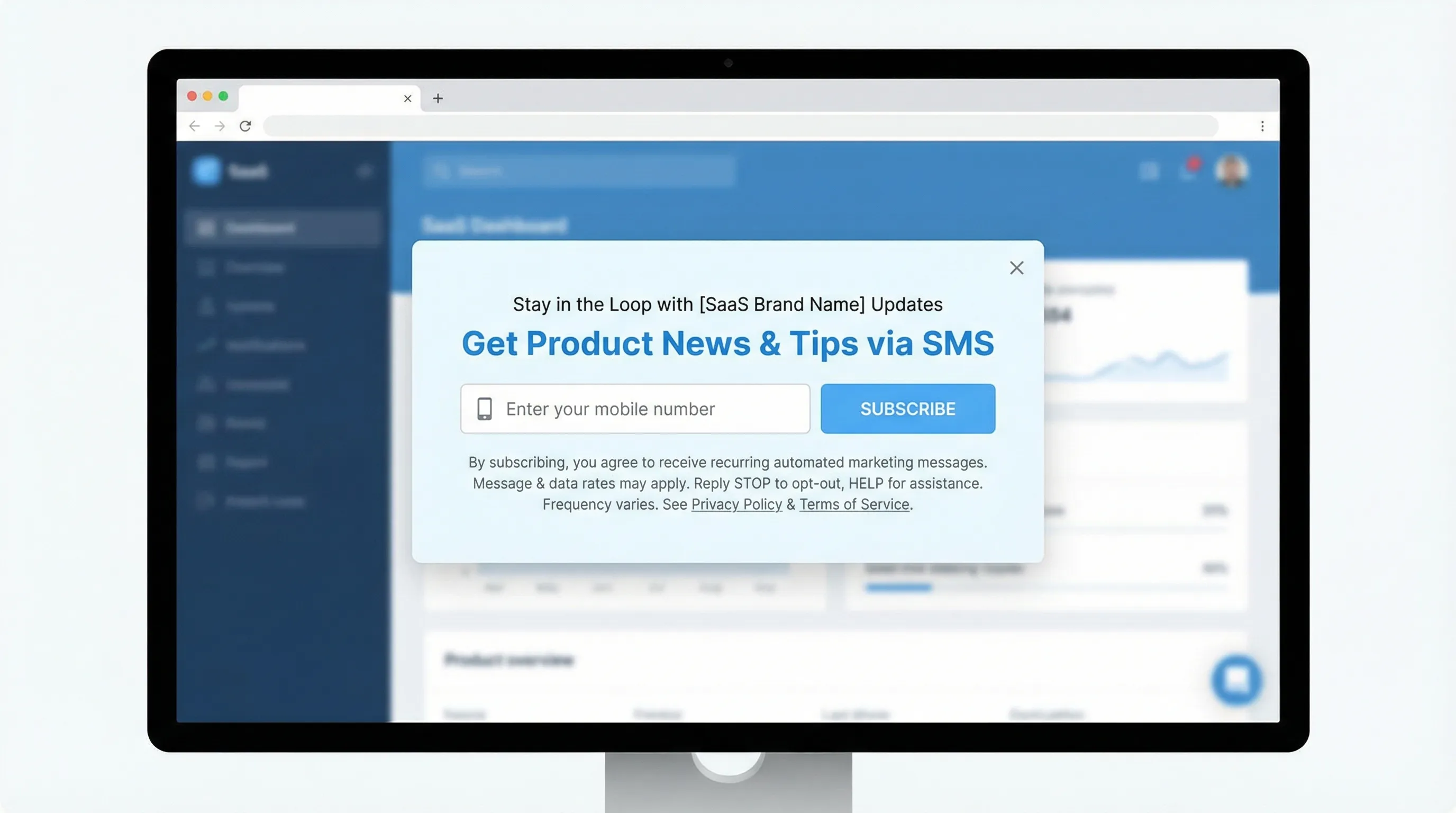
Common elements you should strongly consider including directly in the popup (not only in a footer):
- What they are signing up for: marketing texts, product updates, reminders, or a specific program.
- Message frequency (even a range): “Up to 4 msgs/month.”
- “Consent not required to purchase” (when applicable).
- “Msg and data rates may apply.”
- How to opt out: “Reply STOP to unsubscribe, HELP for help.”
- Links to your Terms and Privacy Policy.
Here is a compliant-style template that still reads like a human wrote it:
CTA button: “Text me the launch link”
Disclosure (small, but readable): “By providing your number, you agree to receive recurring marketing texts from Acme at the number provided. Consent is not a condition of purchase. Msg and data rates may apply. Reply STOP to cancel, HELP for help. Privacy and Terms. Up to 4 msgs/month.”
Do not copy this blindly, adapt it to what you will actually send.
Checkbox or no checkbox?
Some teams add an unchecked checkbox to make consent explicit. Others rely on the submission action plus disclosure text. Your best choice depends on your risk tolerance, jurisdictions, and counsel.
From a conversion standpoint, a checkbox can reduce opt-ins. From a defensibility standpoint, it can increase clarity. If you choose no checkbox, make the disclosure unmissable and keep logs (more on that below).
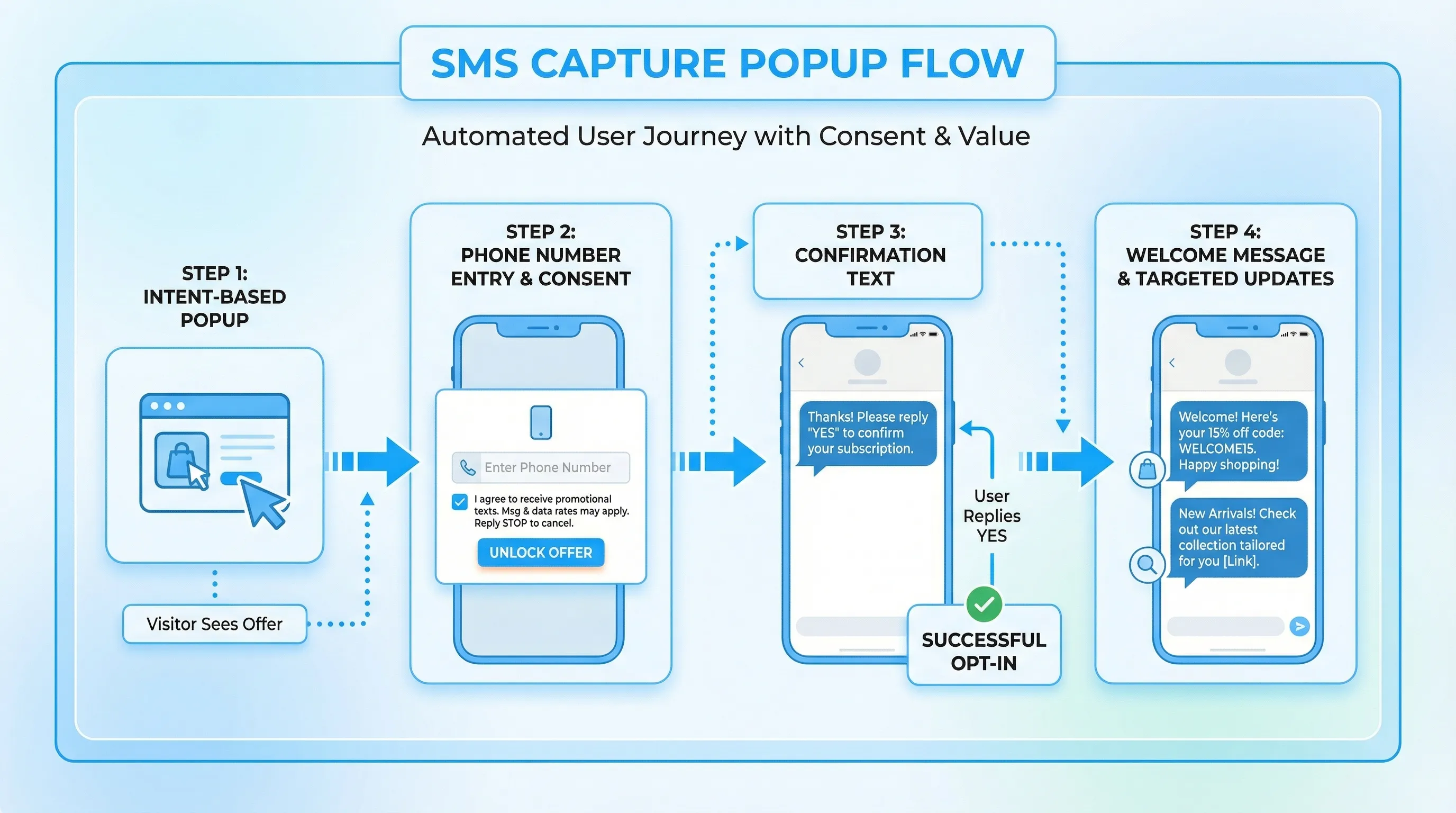
Double opt-in (recommended in many SaaS cases)
Double opt-in is not always legally required, but it is often operationally smart:
- It filters typos and fake numbers.
- It reduces complaint rates.
- It improves list quality (which matters more than raw opt-ins).
A practical pattern:
- Popup collects number with consent disclosure.
- System sends: “Reply YES to confirm subscription to Acme updates. Reply STOP to cancel.”
- Only message confirmed users.
If you are using a double opt-in, say so in the popup so people know what to expect.
The compliance checklist SaaS teams actually use
This table is designed to be copy-pasted into an internal launch doc.
| Area | What “good” looks like | Why it matters |
|---|---|---|
| Consent language | Clear disclosure near the submit button, not buried | Reduces legal risk and user confusion |
| Opt-out | STOP supported, honored quickly, confirmed with a final message | Prevents complaints and carrier filtering |
| Help | HELP returns support info | Required by many provider policies |
| Frequency | Stated realistically (and followed) | Over-texting spikes opt-outs and spam reports |
| Recordkeeping | Store timestamp, page/source, consent text version, IP/user id if available | Useful if consent is challenged |
| Quiet hours | Reasonable sending windows, respect time zones | Reduces complaints and improves engagement |
| Privacy | Privacy Policy includes SMS data usage and retention | Trust and regional compliance |
| Vendor + registration | A2P 10DLC (if applicable), aligned use case and sample messages | Deliverability and throughput |
| Content alignment | Messages match what the popup promised | “Bait and switch” drives opt-outs |
On A2P 10DLC, if you send marketing texts in the US, your SMS provider will typically require brand and campaign registration. Twilio has a practical overview here: A2P 10DLC explained.
Conversion tips that do not sabotage compliance
Compliance is not just legal. It is a conversion lever because it increases trust. The key is to design an SMS capture popup that feels like a fair trade.
1) Lead with an immediate, specific benefit
Weak: “Sign up for SMS updates.”
Better:
- “Get a text when your trial is about to end (so you don’t lose access).”
- “Text me the next onboarding step when I leave this page.”
- “Get incident updates by SMS during this outage.”
If the benefit is vague, users assume you will spam them.
2) Match the popup to intent, not traffic volume
SMS capture performs best when the visitor has demonstrated intent. Common triggers SaaS teams use:
- Pricing page dwell time (example: 20 to 45 seconds)
- Return visit to pricing within 7 days
- Scrolled 60 percent on a comparison page
- Clicked “Integrations” or “Security”
- Started checkout or demo request but did not finish
This is where lightweight targeting and frequency caps matter. If you want a practical framework, Modalcast’s guide on popup frequency capping is a good companion.
3) Use a two-step ask to reduce friction
Instead of immediately showing a phone field, start with a low-friction choice:
- Step 1: “Want a text reminder before your trial expires?” (Yes, remind me)
- Step 2: Phone number field and disclosures
This does two things:
- It pre-qualifies intent.
- It makes the consent feel connected to a clear outcome.
4) Keep the form minimal (and mobile-friendly)
SMS popups are often viewed on mobile. Your form should feel effortless:
- One field (phone number). Avoid collecting name/company unless you have a proven reason.
- Use proper input types (tel keypad).
- Validate gently (formatting and country assumptions can cause false errors).
For broader form UX patterns, see High-Converting Forms: Best Practices for 2025.
5) Make the consent text readable, not microscopic
If your disclosure is unreadable, you have both compliance and conversion problems. Practical tips:
- Keep it to 2 to 4 short lines.
- Use plain language.
- Avoid walls of legal copy.
If you need more detail, link out to Terms and Privacy, but keep the essentials in the popup.
6) Offer the right incentive (and avoid training users to wait for discounts)
Incentives work, but the wrong one creates downstream problems.
Good SaaS incentives:
- “Text me the checklist” (a real asset)
- “Get early access to Feature X”
- “Launch-day bonus for annual plan” (time-boxed)
Risky incentives:
- Permanent “10% off forever” style offers that condition visitors to delay purchase.
If you use coupons, keep them honest and time-bound. Modalcast’s time-limited coupons guide has practical guardrails.
7) Set expectations with “what you will receive” examples
A single line can reduce anxiety:
- “We’ll text 1 onboarding tip this week, then only major updates.”
- “You’ll get 2 reminders: 1 day before and 1 hour before.”
Expectation setting tends to improve opt-in quality even if raw opt-in rate dips slightly.
Three real-world SMS capture popup plays for SaaS
These are implementation-ready patterns that align compliance, intent, and conversion.
Play 1: Trial save, “text me before my trial ends”
Where: In-app or on the billing page during trial.
Popup copy:
- Headline: “Want a heads-up before your trial ends?”
- Body: “We’ll text you 24 hours before your access changes.”
- CTA: “Text me the reminder”
Why it works: The value is concrete, and it is clearly related to what the user is doing.
Compliance tip: If you also plan to send marketing beyond this reminder, do not blur the two. Either scope the consent to reminders, or clearly disclose marketing texts.
Play 2: Demo assist, “get a 2-minute setup plan by text”
Where: Pricing page or after clicking “Request demo” but before form completion.
Popup approach:
- Step 1: “Want the 3 questions to ask on your demo?”
- Step 2: Phone capture
Why it works: Helps the buyer do their job better, not just your pipeline.
Conversion note: Measure downstream, not just opt-ins. Track whether SMS subscribers show up to demos and convert to opportunities at a higher rate.
Play 3: Launch and waitlist, “text me when invites open”
Where: Landing pages for upcoming features, waitlists.
Popup copy:
- Headline: “Invites open soon”
- Body: “Get a text the moment we start letting people in.”
- CTA: “Text me first”
Why it works: Time sensitivity is a natural fit for SMS.
Compliance tip: Avoid vague promises like “exclusive updates” if you will actually send frequent promotions.
Measuring SMS popup performance without fooling yourself
SMS capture popups can “win” on opt-in rate and still lose on revenue if the list is low quality or you trigger spam complaints.
Track a mix of acquisition, quality, and risk metrics.
| Metric | What it tells you | Typical guardrail |
|---|---|---|
| Popup view-to-submit rate | On-site conversion | Compare by page and device |
| Confirmed opt-in rate (if double opt-in) | List quality | If this is low, your offer or UX is off |
| Opt-out rate | Message fit and frequency | Watch spikes after specific campaigns |
| Spam/complaint signals | Deliverability health | Any increase is a serious warning |
| Downstream conversion | Business impact | Trial-to-paid, demo-to-close, upgrade rate |
| Support load | Operational impact | HELP replies, “stop texting” tickets |
A practical SaaS experiment cadence:
- Week 1: Test trigger timing (pricing dwell vs exit intent).
- Week 2: Test offer (reminder vs asset vs incentive).
- Week 3: Test two-step vs one-step.
Keep the consent language consistent during early tests so you do not mix legal changes with conversion outcomes.
Implementation notes if you’re using Modalcast
Modalcast is built around a lightweight on-site widget you can use for popups and forms (including lead capture). For an SMS capture campaign, the practical workflow usually looks like:
- Create a simple form that collects the phone number.
- Add clear consent disclosure text in the popup.
- Target it to high-intent pages and use conservative frequency caps.
- Route submissions into your CRM or SMS provider workflow.
If you need the basics first, start with the Modalcast setup guide. If you are refining UX and timing, Modalcast’s playbook on lead capture that doesn’t feel pushy is a good next read.
Frequently Asked Questions
Do SMS capture popups require a checkbox for consent? Not always, but many teams use an unchecked checkbox to make consent explicit. Requirements vary by jurisdiction and risk tolerance. If you skip the checkbox, keep disclosures clear and keep strong consent records.
What consent text should I include for marketing SMS? At minimum, clearly state that the user agrees to receive recurring marketing texts, include message frequency, “consent not required to purchase,” “msg and data rates may apply,” STOP/HELP instructions, and links to Privacy and Terms.
Is double opt-in required for SMS marketing? Often it is not strictly required, but it is commonly recommended because it reduces typos, improves list quality, and can reduce complaint rates.
How do I keep SMS popups from hurting UX and conversions? Trigger them only on high-intent behavior, apply frequency caps, use a two-step ask, keep the form to one field, and make disclosures readable. Measure downstream impact, not just opt-ins.
What is A2P 10DLC and do I need it? If you send application-to-person messages from a standard US long code, your SMS provider will typically require A2P 10DLC brand and campaign registration. It affects deliverability and throughput.
Build an SMS capture popup you can actually ship
If you want to launch an SMS capture popup without turning it into an engineering project, start with a lightweight widget and keep the first version simple: one offer, one field, clear consent, conservative targeting.
Modalcast can help you ship and iterate quickly using a single on-site widget for popups and forms. Create your SMS capture popup, set intent-based triggers, and refine based on real conversion and opt-out data.
Get started at Modalcast.
