Lead Scoring From On-Site Interactions
Most SaaS lead scoring models still rely on email clicks and form fills. That works, but it misses the highest-signal behavior: what people do on your site or i

Most SaaS lead scoring models still rely on email clicks and form fills. That works, but it misses the highest-signal behavior: what people do on your site or in your app right before they convert (or churn).
“Lead scoring from on-site interactions” is the practical alternative: assign points to actions that indicate intent, then route and personalize based on that score. Done well, it helps you:
- Respond faster to high-intent visitors (before they leave).
- Stop treating every signup or contact form as equal.
- Connect marketing attribution to sales priority and product intent.
This guide shows a simple, SaaS-friendly scoring approach you can implement without building a data warehouse first.
What “lead scoring from on-site interactions” actually means
On-site interactions are measurable actions a visitor takes on your website (and often in your app) such as:
- Visiting specific pages (pricing, security, integrations, migration docs)
- Clicking key elements (request demo, compare plans, start trial)
- Engaging with widgets (opening a feedback widget, answering a microsurvey, submitting a form)
- Repeating a behavior across sessions (returning to pricing 3 times in a week)
Lead scoring is the method of translating those signals into a single number (or tier) that represents likelihood to convert, upgrade, or become a good-fit sales opportunity.
The goal is not to be “perfect.” The goal is to be directionally right and operational:
- Who should sales contact today?
- Who should see a different on-site message?
- Who should enter a high-intent nurture?
Why on-site interactions are usually stronger than email-based scoring
Email and ads are “downstream” signals. On-site behavior is often “in-the-moment.” For SaaS teams, that matters because the buying journey can be short, nonlinear, and multi-threaded (someone evaluating for themselves, a manager, plus procurement).
On-site interactions tend to be more predictive when they:
- Are tied to a specific job to be done (for example, “SCIM setup,” “SOC 2,” “SSO,” “migration from X”)
- Indicate evaluation behavior (pricing comparisons, reading limitations, checking integrations)
- Reveal urgency (return visits, time-on-page for key pages, reaching checkout but not converting)
They are also first-party signals, which is increasingly important as browsers and platforms limit third-party tracking.
A simple framework: score “intent,” not “activity”
One common failure mode is scoring volume of clicks. That inflates scores for curious browsers, students, competitors, and bots.
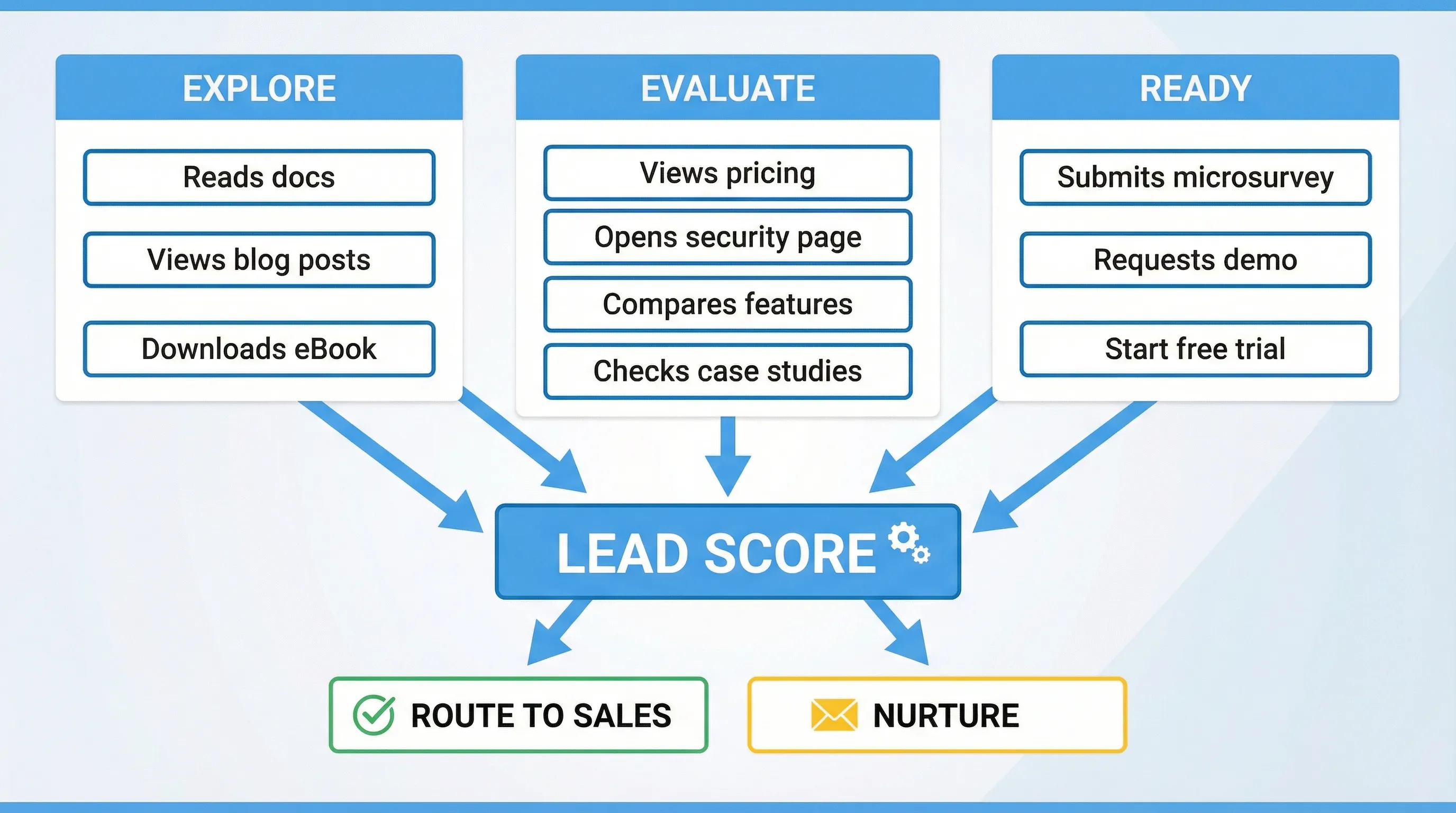
A better approach is to map interactions to intent stages.
Intent stages you can actually act on
| Stage | What it means in SaaS | What you should do | Example on-site signals |
|---|---|---|---|
| Explore | Learning what you do | Educate, reduce friction | Blog and docs browsing, homepage scrolling |
| Evaluate | Comparing options and fit | Prove value, remove risk | Pricing, integrations, security, migration content |
| Ready | Trying to start or buy | Route fast, make it easy | Trial start, demo request, checkout intent |
| At-risk (existing users) | Might churn or stall | Intervene, diagnose | Repeated help-center visits, cancel page, low activation |
Your lead scoring should mostly differentiate Evaluate and Ready, because those are the stages where speed and personalization move revenue.
A practical scoring model you can copy
Below is a starter scoring table for a typical B2B SaaS site. Treat the point values as placeholders, then calibrate them with your own conversion data.
Suggested point values for on-site interactions
| Signal type | Interaction | Suggested points | Why it matters |
|---|---|---|---|
| High intent | Visited pricing page | +10 | Strong evaluation behavior (but not sufficient alone) |
| High intent | Visited security/compliance page | +12 | Often tied to enterprise and late-stage evaluation |
| High intent | Visited integration page for a key integration (for example, Salesforce, Slack, Zapier) | +8 | Indicates implementation planning |
| High intent | Clicked “Request demo” or “Talk to sales” | +25 | Clear buying motion |
| High intent | Started checkout or plan selection | +30 | Strong purchase intent |
| Qualification | Submitted an on-site form with business email | +20 | Converts anonymous to known, higher follow-up value |
| Qualification | Answered a microsurvey indicating near-term timeline (for example, “this month”) | +15 | Explicit intent declaration |
| Medium intent | Returned to site within 7 days | +6 | Repeat evaluation across sessions |
| Medium intent | Spent meaningful time on a key page (set your own threshold) | +5 | Suggests deeper reading, but can be noisy |
| Low intent | Visited careers page | -10 | Often job seekers, not buyers |
| Low intent | Visited docs only (no pricing, no product) | -5 | Often students or existing users, depends on your product |
| Risk control | Unsubscribed from emails (if you track it) | -8 | Reduces nurture effectiveness |
Two important notes:
- Use fewer, higher-signal events. A model with 12 signals you trust beats 80 signals you do not.
- Include negative scoring. It prevents inflated scores and improves routing accuracy.
Where on-site widgets fit (and why they can improve scoring quality)
Page views and clicks are implicit signals. Widgets (forms, short surveys, feedback prompts) can capture explicit signals, which usually improves scoring accuracy.
Examples of explicit, scoreable answers you can collect with a lightweight on-site widget:
- “What best describes you?” (Founder, PM, Engineer, Agency)
- “What are you trying to do?” (Replace X, add feature Y, reduce costs)
- “What is your timeline?” (Today, this week, this month, just browsing)
- “What stopped you from starting a trial?” (Pricing, security, setup time, missing feature)
Tools like Modalcast are designed for exactly this type of on-site interaction: collect feedback, capture leads, and share updates using one simple widget, without adding heavy UX overhead.
If you already run popups, microsurveys, or feedback forms, you likely have additional qualification data that your lead scoring model should use.
Step-by-step: implement lead scoring from on-site interactions
1) Decide what you are scoring for
Pick one primary outcome. Common options:
- Demo request likelihood (sales-led motion)
- Trial-to-paid likelihood (PLG motion)
- Upgrade likelihood (expansion)
Your scoring model should match that outcome. For example, reading the “Security” page might be very predictive of demo requests, but less predictive of self-serve conversion.
2) Define your “must-score” pages and actions
Most SaaS sites have a small set of pages that carry disproportionate intent. Typical examples:
- Pricing
- Integrations (especially “native” and “migration from” pages)
- Security, compliance, DPA, legal
- Case studies and comparison pages
- Trial start, checkout, demo
Then list actions that indicate the visitor tried to progress:
- Clicked a primary CTA
- Opened a lead capture widget
- Submitted a form
- Answered a qualifying microsurvey
3) Choose an identity strategy (anonymous vs known)
On-site scoring gets tricky because most visitors are anonymous.
A pragmatic approach:
- Anonymous score: tracked by a first-party identifier (cookie/local storage) until the visitor identifies.
- Known score: once they submit an email (or sign in), merge the anonymous history into the contact record.
If you do not merge scores, you will systematically underestimate high-intent leads who browse first and convert later.
4) Add decay so old intent does not look like current intent
Intent expires. Someone who hit pricing six months ago is not necessarily hot today.
A simple rule you can implement without complex modeling:
| Time since interaction | Score multiplier (example) |
|---|---|
| 0 to 7 days | 1.0 |
| 8 to 30 days | 0.6 |
| 31 to 90 days | 0.3 |
| 90+ days | 0.1 |
This keeps the model responsive to what is happening now.
5) Set score thresholds you can operationalize
Avoid “one giant score” that nobody trusts. Convert scores into tiers:
| Tier | Example threshold | What happens |
|---|---|---|
| P0 (hot) | 40+ | Route to sales or high-touch outreach within minutes/hours |
| P1 (warm) | 20 to 39 | Enter high-intent nurture, show product proof and implementation help |
| P2 (early) | 0 to 19 | Keep educational, focus on activation and trust |
The right thresholds depend on your traffic and sales capacity. Set them so the P0 bucket is realistically actionable.
6) Use the score immediately on-site (not only in your CRM)
The fastest win from on-site scoring is changing what a visitor sees during the same session.
Examples:
- If score is high and the visitor is on pricing, show a non-pushy prompt offering help: “Want a quick recommendation on the right plan?”
- If score is high and they viewed security, offer the compliance packet or a link to your DPA.
- If score is medium and they keep returning, ask one qualifying question via microsurvey to convert implicit intent into explicit intent.
This is where an on-site engagement widget can be useful, because it lets you present forms, microsurveys, or updates contextually, instead of relying entirely on nav clicks.
For practical patterns on capturing leads without wrecking UX, see Lead capture that doesn’t feel pushy.
7) Validate the model against real outcomes
A scoring model is only useful if higher scores correlate with outcomes.
Track these checks monthly:
- Conversion rate by tier (P0 vs P1 vs P2)
- Sales acceptance rate by tier (if you are routing to SDRs/AEs)
- Time-to-first-response for P0 leads
- False positives (high score, low close rate) and false negatives (low score, high close rate)
Then adjust weights.
Real-world examples (SaaS scenarios)
Example 1: PLG product with a self-serve trial
Goal: increase trial-to-paid conversion.
High-intent signals might be:
- Viewing plan limits or seat pricing
- Visiting “Integrations” or “API” pages
- Reading implementation docs (but only after product page views)
A good on-site widget interaction here is a short “plan fit” prompt on pricing, where the user selects company size or use case. The answer becomes a scoring input and also lets you personalize the recommended plan.
Example 2: Enterprise motion where security pages are pivotal
Goal: prioritize enterprise pipeline.
High-intent signals might be:
- Security/compliance page visits
- Viewing SSO/SCIM documentation
- Repeated visits from the same company network (if you track that in your stack)
A practical widget play:
- On the security page, offer “Get the security overview PDF” (lead capture) and include one field like “Do you need SSO?”
This captures explicit enterprise qualifiers you can score higher than generic page views.
Example 3: Content-led acquisition where visitors arrive via SEO
Goal: convert readers into product-qualified leads.
Common issue: content visitors inflate activity metrics but never buy.
Fix: score only the behaviors that show a transition from content to product evaluation:
- From blog post to product page
- From blog post to pricing
- From blog post to a targeted microsurvey (“Is this a problem you are solving this quarter?”)
Common pitfalls (and how to avoid them)
Pitfall 1: Treating every click as intent
If your model rewards generic actions (scrolling, page depth, random clicks), you will build a “curiosity score,” not a lead score.
Fix: overweight explicit actions (CTA clicks, form submits, survey answers) and key pages.
Pitfall 2: Scoring without frequency capping or UX guardrails
If you pop a survey on every page, you will collect more data but lose conversions.
Fix: cap frequency and target by intent. If you use popups/widgets, implement sensible limits. Modalcast has published a practical guide on this topic: Popup frequency capping that protects UX.
Pitfall 3: No decay, so old visits look “hot” forever
Fix: decay scores over time (even a simple multiplier table is enough).
Pitfall 4: Not aligning scoring to sales capacity
If you send 200 “hot” leads a day to a 2-person sales team, they stop trusting the model.
Fix: raise thresholds or narrow the signals that create P0.
Pitfall 5: Over-collecting data (privacy and trust)
Lead scoring should not require invasive tracking.
Good practices:
- Collect only what you need (data minimization)
- Be transparent about what you collect and why
- Avoid sensitive categories unless you have a strong legal basis
(If you are designing on-site questions, progressive profiling can help you gather details over time without long forms. See Progressive profiling: a simple starter guide.)
A lightweight “starter stack” for on-site lead scoring
You do not need an enterprise CDP to begin. Most SaaS teams can start with:
- Web analytics or event tracking (to capture page and CTA events)
- A CRM or marketing automation system (where the score is stored and used)
- An on-site widget for explicit signals (forms, microsurveys, feedback)
Then iterate. The biggest step change usually comes from adding 2 or 3 explicit intent questions at the right moment, not from instrumenting 200 events.
Frequently Asked Questions
What is lead scoring from on-site interactions? It’s a method of assigning points to behaviors people take on your website or in-app (pricing visits, demo clicks, form submits, microsurvey answers) to estimate purchase intent and route leads.
Which on-site interactions are most predictive for B2B SaaS? Typically pricing, security/compliance, key integration pages, repeated return visits, demo requests, and explicit answers to qualification questions (timeline, role, use case).
How do I avoid annoying users while collecting scoring data? Use intent-based targeting and frequency caps, ask one short question at a time, and only prompt on high-intent pages (pricing, integrations, security) instead of interrupting every session.
Should I score anonymous visitors? Yes, if possible. Track an anonymous score until someone identifies (email capture or login), then merge their history into the known lead record so you do not lose early intent.
How often should I update my scoring model? Start simple, then review monthly. Re-weight signals based on real conversion outcomes and sales acceptance, and add decay so older activity does not inflate current intent.
Turn on-site intent into better leads with a lightweight widget
If you want better lead scoring, you need better inputs, not just more clicks. A simple way to add high-signal inputs is to capture explicit intent with short, contextual on-site prompts.
Modalcast is a lightweight engagement and feedback widget for SaaS and websites. You can use it to collect user feedback, capture leads, and share updates through on-site messages, forms, and microsurveys.
Explore Modalcast at modalcast.com and run a small experiment: add one high-intent microsurvey on your pricing page, then use the answers to prioritize follow-up and personalize what visitors see next.
