Inventory-Aware Promotions for Ecommerce
Inventory-aware promotions match your discounts and messages to real stock conditions, not just the marketing calendar. Done well, this increases conversion where you have excess supply, protects margin when items are hot, and captures future demand when products are unavailable.

Inventory-aware promotions match your discounts and messages to real stock conditions, not just the marketing calendar. Done well, this increases conversion where you have excess supply, protects margin when items are hot, and captures future demand when products are unavailable. This guide shows how ecommerce teams can design, trigger, and measure inventory-aware offers using lightweight on-site messaging, forms, and coupons.
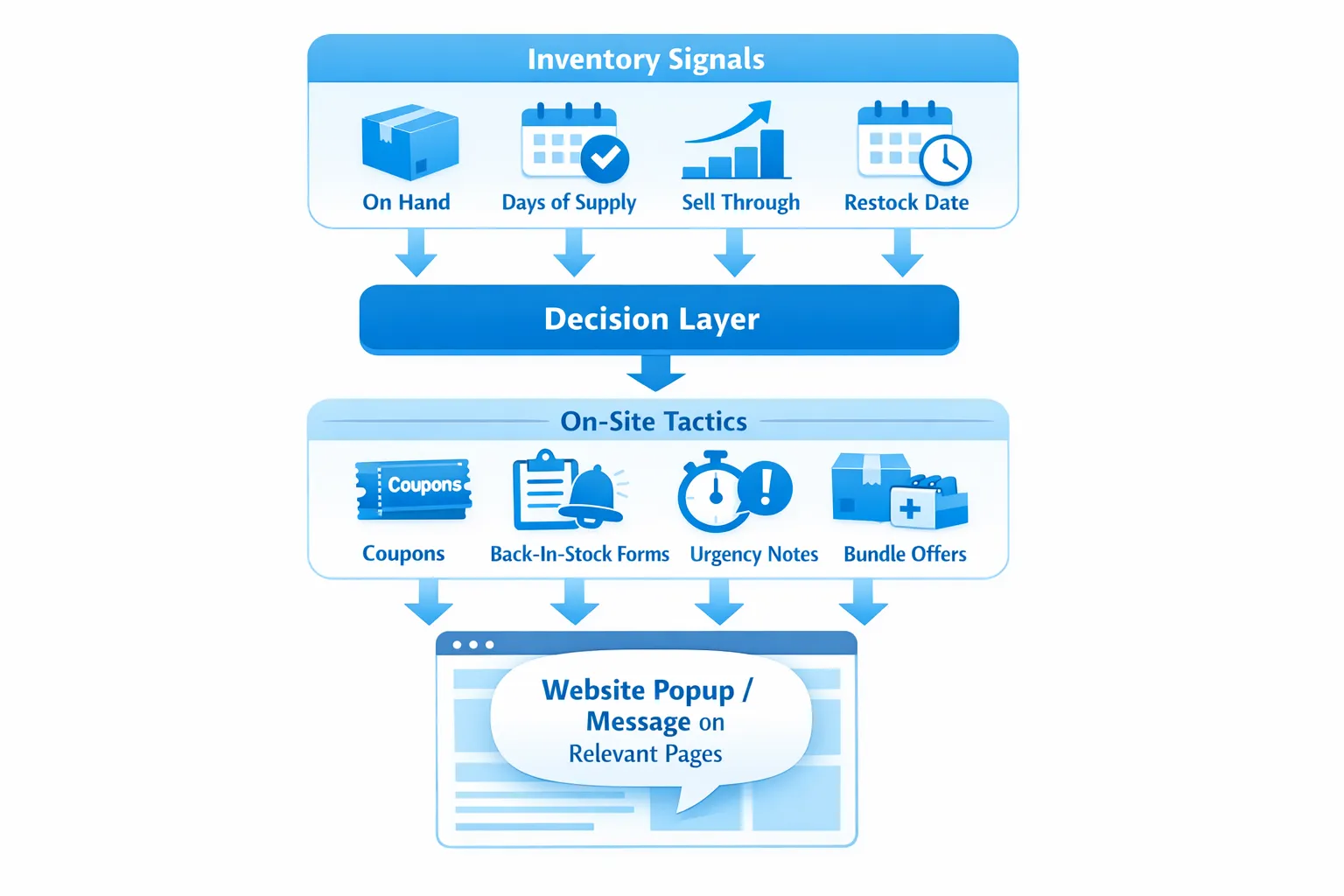
What “inventory-aware” really means
Most sitewide sales treat every SKU the same. Inventory-aware promotions use operational signals to decide if you should discount, nudge, or collect demand. Common inputs:
- On hand units and safety stock
- Days of supply, based on forecasted demand
- Sell-through velocity and aging stock
- Margin guardrails by product or category
- Seasonality window and end of life
- Restock ETA and reliability of the supplier
The goal is simple, push harder where you have excess or aging inventory, hold price when demand is strong, and collect intent when stock is constrained.
Quick playbook map
| Inventory signal | Typical threshold example | Suggested tactic | Placement | Primary KPI |
|---|---|---|---|---|
| Overstock or aging stock | Coverage days greater than 90, or season end within 21 days | Tiered coupon or limited time markdown, price anchoring and social proof | Product page, category grid, exit intent on cart | Gross margin after promo, sell-through rate |
| Low stock and high demand | Units less than 5 or due to restock beyond 14 days | Urgency copy without discount, alternative recommendations, email capture for back in stock | Product page, cart | Conversion rate without discount, waitlist signups |
| Slow mover, adequate stock | Units greater than 30, low velocity relative to category | Targeted offer with small incentive, or bundle attach discount | Product page, post add to cart | Add-on rate, attach rate |
| Out of stock with reliable restock | ETA within 7 to 21 days | Back-in-stock form, preorder if allowed, explain ETA | Product page | Waitlist size, preorder conversion |
| Category level surplus | Over-allocation in one category, capacity constraints in another | Cross-category bundles, gift with purchase tied to surplus category | Category pages, cart | AOV, specific SKU depletion |
Note, thresholds should reflect your demand patterns and lead times. Start with conservative triggers and widen once you see stable results.
Five practical plays you can ship this week
1) Overstock clearance without blasting a sitewide sale
When coverage days for a SKU or style are high, use a tiered incentive that scales with cart value. Example copy, We stocked up on this season’s joggers, get 15 percent off this style today, code JOG15. Escalate to 20 percent if cart includes two or more joggers.
Implementation notes:
- Trigger on product pages where overstock flag is true, suppress on checkout to avoid distraction.
- Use a website popup tool to present a clear coupon and the code, avoid multi-field forms unless you require email for higher tiers.
- Cap exposures per user, and pause the campaign automatically when on hand falls below your target.
Helpful how-tos, see coupons in Driving Conversions with ModalCast and quick setup in the ModalCast setup guide.
2) Low stock urgency with alternatives and a waitlist
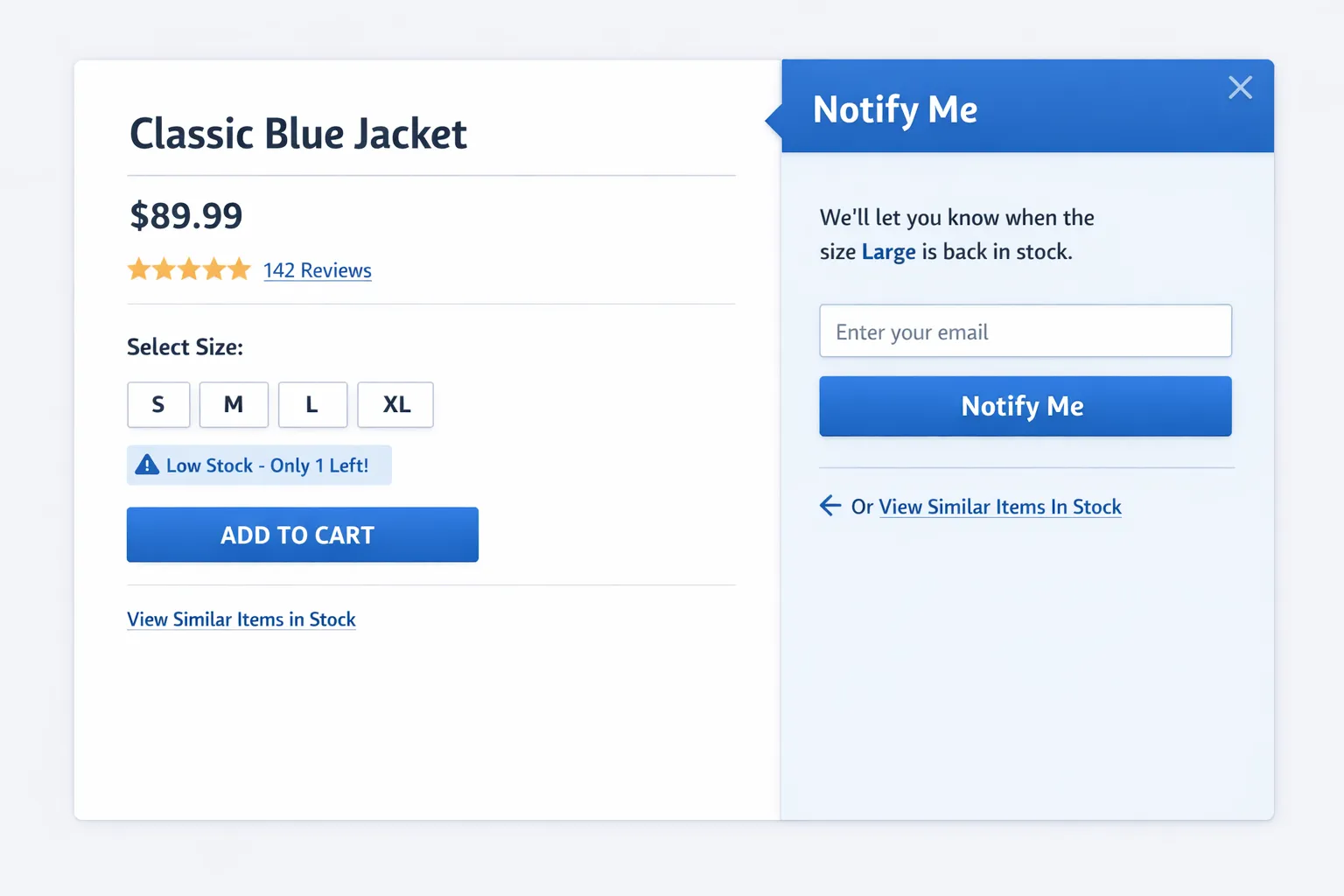
If inventory is thin, protect margin. Replace discounts with urgency and choice. Example, Only 3 left in M, ships today. Prefer a different color, see similar fits. When stock is out or the size is missing, offer a back-in-stock form that saves the session’s product attributes.
Implementation notes:
- Keep the first step frictionless, email only. Use a small text link, We will only notify you once for this item, to build trust.
- Show alternatives that are actually in stock, even a simple link to a filtered category works.
- If restock ETA is known, include it, Back in stock around Jan 14.
See forms in How to create a customer feedback form using ModalCast and microsurveys for quick preferences in How to set up microsurveys.
3) Slow movers, aim for an attach instead of a raw discount
For items that move slowly but still matter for assortment, test an attach offer. Example, Add protective spray with your boots and save 10 dollars on the set, or Free socks when you add any 2 tees. You are converting surplus into value without devaluing the hero product.
Implementation notes:
- Trigger when cart contains target SKU group, show a light slide-in rather than a blocking modal.
- Use a single obvious button, Add both and apply savings.
- Measure attach rate and resulting AOV, turn off when surplus is cleared.
4) Seasonal end-of-life, time box the message
When the season is ending, set a hard stop for your offer, and mention the reason. Example, Final week for winter styles, we are clearing shelf space. Reason plus deadline improves credibility.
Implementation notes:
- Start with a mild incentive, raise the offer only if sell-through misses plan by mid-window.
- Pair banners with targeted product page popups on affected items, avoid blasting the entire site.
- Document the last-eligible ship date in the message if logistics are tight.
5) Restock and preorder, capture future demand cleanly
If replenishment is reliable, consider preorders or one-click notify. Keep expectations realistic and provide an easy cancel link in the email. Example, Reserve your size, ships in two weeks.
Implementation notes:
- If you cannot take payment, the next best option is a back-in-stock list with size and color captured via a compact form.
- Track the conversion from notify to purchase, it tells you if the product warrants deeper buy quantities next cycle.
How to wire triggers without heavy engineering
You do not need a full promotions engine to start. Pass a few inventory flags to the front end, then use conditional triggers in your on-site messaging tool.
Example, expose data on product pages:
<script>
  window.__inv = {
    sku: "JOG-SEA-2025",
    onHand: 124,
    daysOfSupply: 120,
    isOverstock: true,
    isLowStock: false,
    restockEta: null,
    marginPct: 48
  };
</script>
Then add a tiny script that marks the page for the right campaign:
<script>
  (function () {
    var d = window.__inv || {};
    if (d.isOverstock && d.daysOfSupply > 90) {
      document.documentElement.classList.add("promo-overstock");
      localStorage.setItem("promo_overstock_seen", Date.now());
    }
    if (d.onHand > 0 && d.onHand < 5) {
      document.documentElement.classList.add("promo-lowstock");
    }
    if (d.onHand === 0 && d.restockEta) {
      document.documentElement.classList.add("promo-backinstock");
    }
  })();
</script>
Configure your website popup tool to trigger when a CSS selector or class exists, for example show the “Overstock clearance” coupon when .promo-overstock is present, and show the back-in-stock form when .promo-backinstock is present. This pattern keeps your promotion logic independent from the tool, and it works across themes and platforms.
Guardrails to include from day one:
- Margin floor, only show a discount if marginPct is above your minimum for that SKU or category.
- Page exclusions, never interrupt checkout and payment pages.
- Frequency caps, limit impressions per user per week, and suppress repeats after a redemption.
- Channel rules, avoid double discounting with partner coupons or paid search promos.
Copy patterns that set the right expectation
- Reason for the offer, We ordered deep for the holidays, take 15 percent off this style while supply lasts.
- Honest urgency, Fewer than 5 left in M, ships today. No timer unless it is real.
- Choice and control, Not your size, get a one-time back-in-stock alert.
- Clarity on redemption, Code applies automatically in cart, or Enter code WINTER15 at checkout.
If you collect emails to unlock a coupon, keep it clear that you are exchanging value for contact permission. For compact form best practices, see High-converting forms if available on your region, or use the form tips in our feedback form guide.
Measurement, prove incremental value not just activity
Define success in margin terms, not only coupon redemptions.
- Primary, Incremental gross margin dollars from targeted SKUs over the test window.
- Secondary, Sell-through rate improvement for flagged SKUs, waitlist size and conversion, attach rate for bundles, AOV, time to depletion for surplus inventory.
Run a simple holdout test over 14 days:
- 50 percent of eligible visitors see the inventory-aware message or coupon, 50 percent do not.
- Attribute redemptions correctly to the campaign by using a specific code or an auto apply parameter.
- Analyze at the SKU level, then roll up by category so you can tune thresholds later.
Common pitfalls and how to avoid them
- Discounting items that are already constrained, protect margin, use urgency and alternatives instead.
- Fake scarcity, only show low-stock copy if the data is current. If you cannot trust the feed, suppress the claim.
- No caps, repeated popups erode trust and hurt mobile UX. Cap impressions and respect dismissals.
- Ignoring logistics, do not promise delivery timelines you cannot meet, include the last ship date during peak periods.
- One size fits all thresholds, a 5-unit threshold for low stock makes no sense for a fast-selling accessory, use days of supply when possible.
Implementation checklist you can adapt
- Confirm your inventory fields, on hand, safety stock, margin, restock ETA, category, days of supply if available.
- Expose a lightweight JSON object on product pages, include only what you need for triggers.
- Define three or four campaign states, overstock, low stock, back in stock, attach bundle.
- Configure triggers in your user engagement platform using CSS classes or data attributes set by your script.
- Add frequency caps, page exclusions, and channel rules.
- Launch a small A or B test, monitor redemptions, AOV, and sell-through.
- Rotate copy weekly, update thresholds once you see stability.
Where ModalCast fits
ModalCast is a lightweight user engagement widget that can show coupons, forms, instant surveys, and product updates with flexible triggers. For the plays above, you can:
- Create a coupon message for overstock SKUs and trigger it when your script adds a specific class.
- Add a one-field back-in-stock form and capture emails as a lead generation widget.
- Use a brief microsurvey to ask, What stopped you from buying today, when stock is healthy but conversions are weak.
If you are new to the tool, start with the setup guide, learn coupon basics in Driving conversions with ModalCast, and see what a feedback widget can collect without harming UX.
FAQ
How do I choose thresholds for overstock or low stock? Start with days of supply based on your typical weekly sales, for example low stock when coverage is less than one week, overstock when coverage exceeds 8 to 12 weeks or you are inside the final 2 to 3 weeks of a season. Tune by category once you have a month of results.
Should I ever discount low-stock items? Usually no, use urgency and alternatives to protect margin. Offer discounts when it helps clear surplus or aging inventory, or when you need to stimulate attachment for slow movers.
What if my inventory data is not perfectly real time? Use conservative messages, avoid exact counts, and suppress scarcity claims if your feed lags. You can still run overstock and back-in-stock flows based on daily snapshots.
Can this work on Shopify, WooCommerce, or custom storefronts? Yes. The approach relies on exposing a few inventory flags on product pages and using a website popup tool to trigger campaigns. It is platform agnostic.
How do I prevent promotions from annoying users? Add frequency caps, respect dismissals for a period, avoid blocking modals for low-intent moments, and suppress on checkout. Keep first-step forms to one field.
What is the best way to measure impact? Use A or B holdouts and measure incremental gross margin and sell-through improvement for targeted SKUs. Redemptions alone can be misleading if they cannibalize full-price orders.
Ready to ship inventory-aware promotions without a heavy build, Use ModalCast to launch targeted coupons, waitlist forms, and microsurveys tied to your own inventory flags. Try the widget, and see how quickly you can turn surplus into revenue while protecting margin where it matters. Get started at ModalCast.
